


.png)
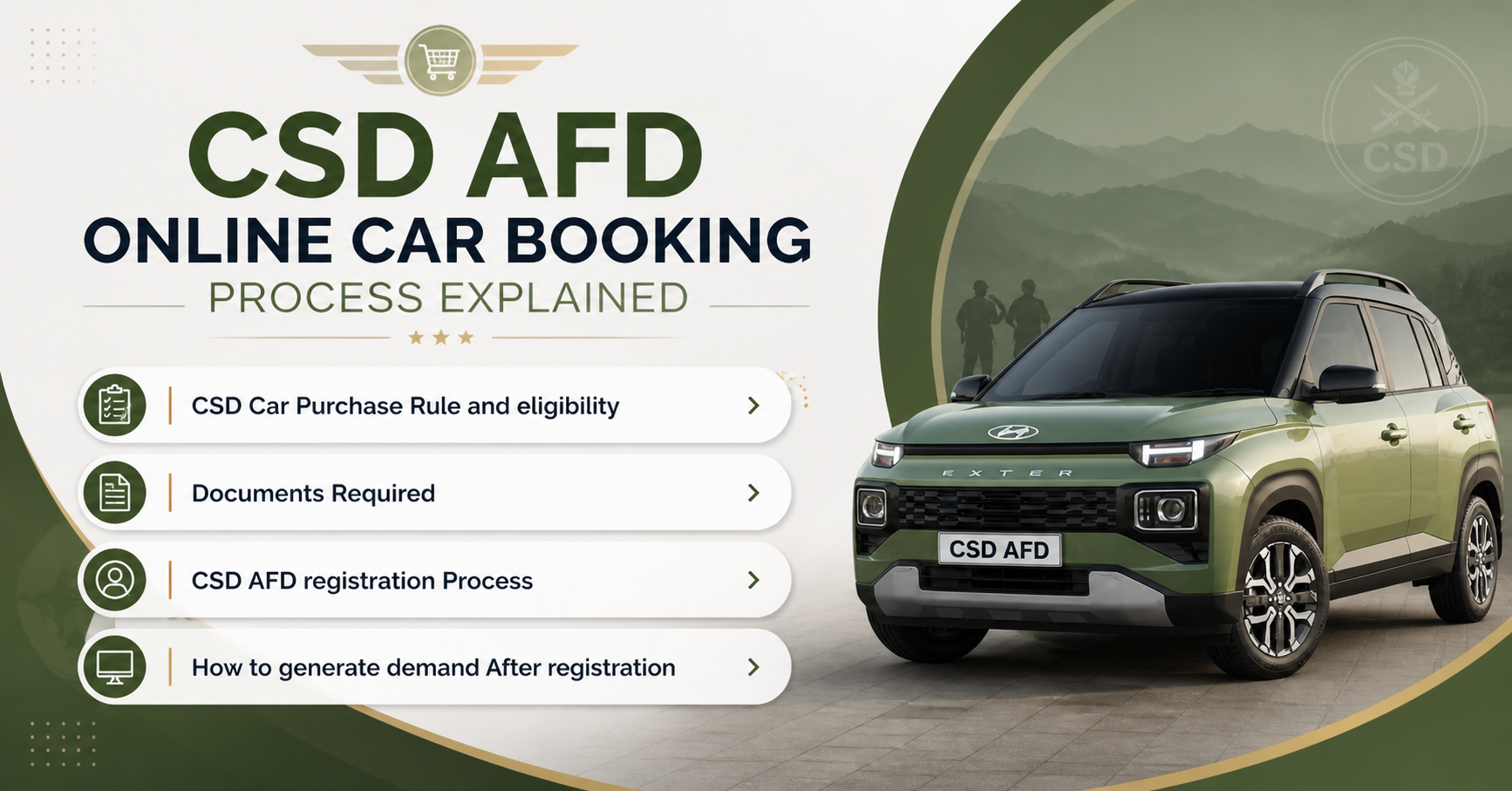
The CSD AFD portal provides a convenient way for serving and retired armed forces personnel, as well as defense civilians, to access a wide variety of products at special rates. To benefit from this facility, eligible individuals must complete an online CSD AFD login registration process.
This guide outlines the registration steps in a simple manner and details the documents required. Whether you’re new to the portal or need a refresher, this will help you register smoothly and begin using your account without any issue and delay.
By understanding this process, you can unlock the benefits of accessing quality products at competitive prices through the CSD AFD portal.
CSD AFD registration is open to serving and retired armed forces personnel & defense civilians only. Ensure you meet the eligibility criteria outlined on the official CSD AFD registration page before proceeding with the registration process. Below is the list of eligible defence personnel :-
To complete the registration, you will need the following documents:
Smart Canteen Card
You will need a valid Smart Canteen Card issued by the Canteen Stores Department. The card contains important information such as your name, card ID, chip number, and organization details.
PPO
If you are an ex-serviceman, you will need to have a copy of your Pension Payment Order. The PPO contains essential details regarding PPO number, date of birth, date of enrollment, date of discharge & Pay level.
PAN Card
You should have your PAN card number to enter on the CSD AFD registration page.
Mobile Number & Email Address
The eligible person should have an active mobile number and email address. The mobile number & email id is used to send OTP, password reset and communication regarding CSD AFD product orders. Therefore, use the active mobile and email id during rgistration.
Please ensure that all the documents and information you provide are valid, up-to-date, and in the prescribed format. Any discrepancies or incomplete information may result in delays or rejection of your registration.
After registration, the eligible CSD customers can check car prices, bike price and CSD dealers after CSD AFD login and place online orders on CSD portal.
To register yourself on CSD AFD portal, you can follow the below steps:-
Search "afd.csdindia" in google search.
To access the CSD AFD registration portal, open the google search in web browser. Thereafter search "afd.csdindia" in google. You will get CSD portal in the search result as shown in the image below. Click on it and you will be redirected to offical CSD AFD portal.

Go to CSD AFD login page.
On the CSD AFD portal homepage, you will get a button named SHOP NOW. Click on it. It will redirect you on the CSD AFD login page. On this page, you will find username, password and captcha option as shown in the below image. This page is for registered users. Click on the "New user Registration" button.

Open CSD AFD online registration page.
After clicking the "New user Registration" tab, it will redirect you to the registration page as shown below.
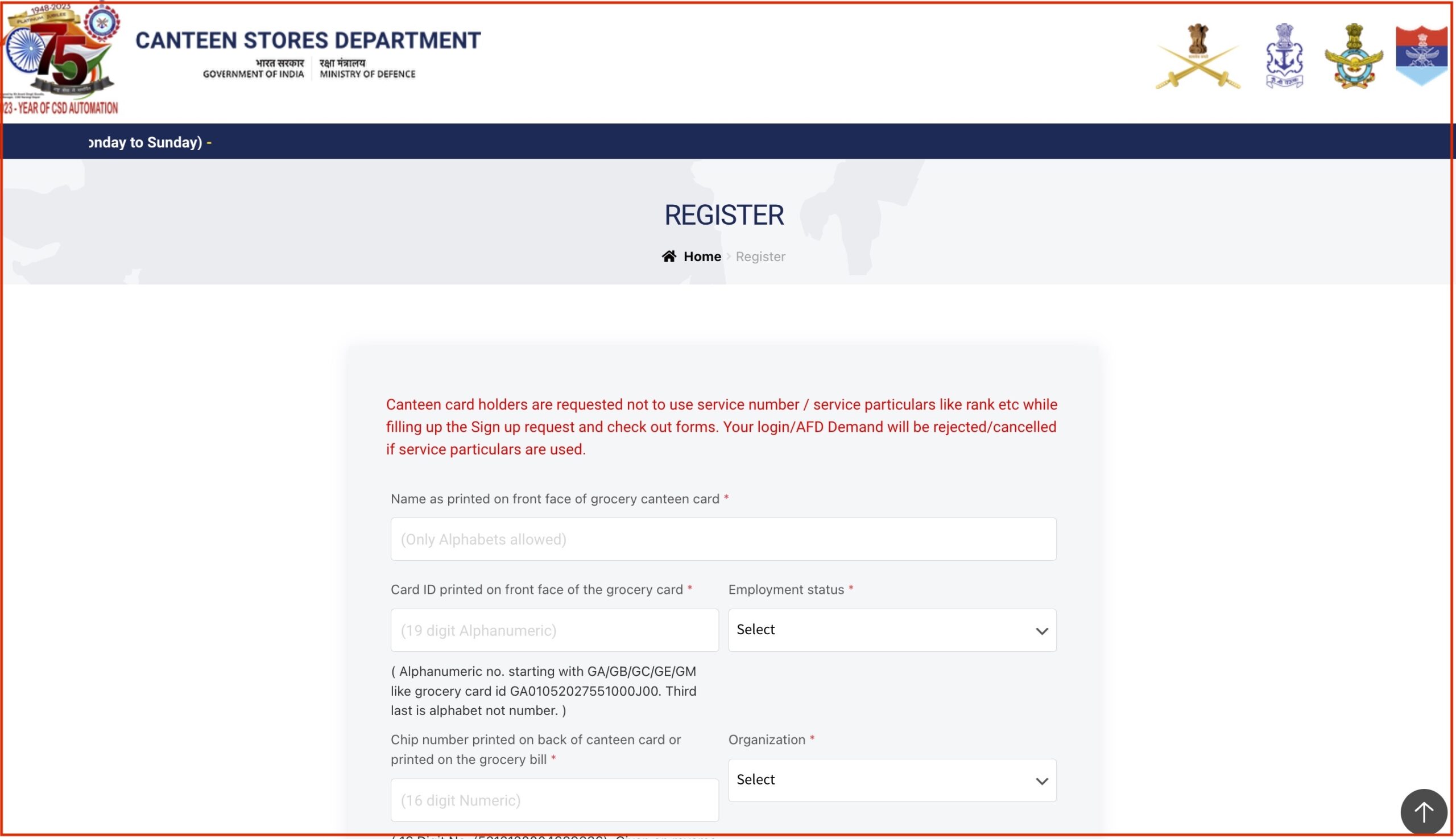
Fill in the registration form:
Provide the requested information in the appropriate fields:
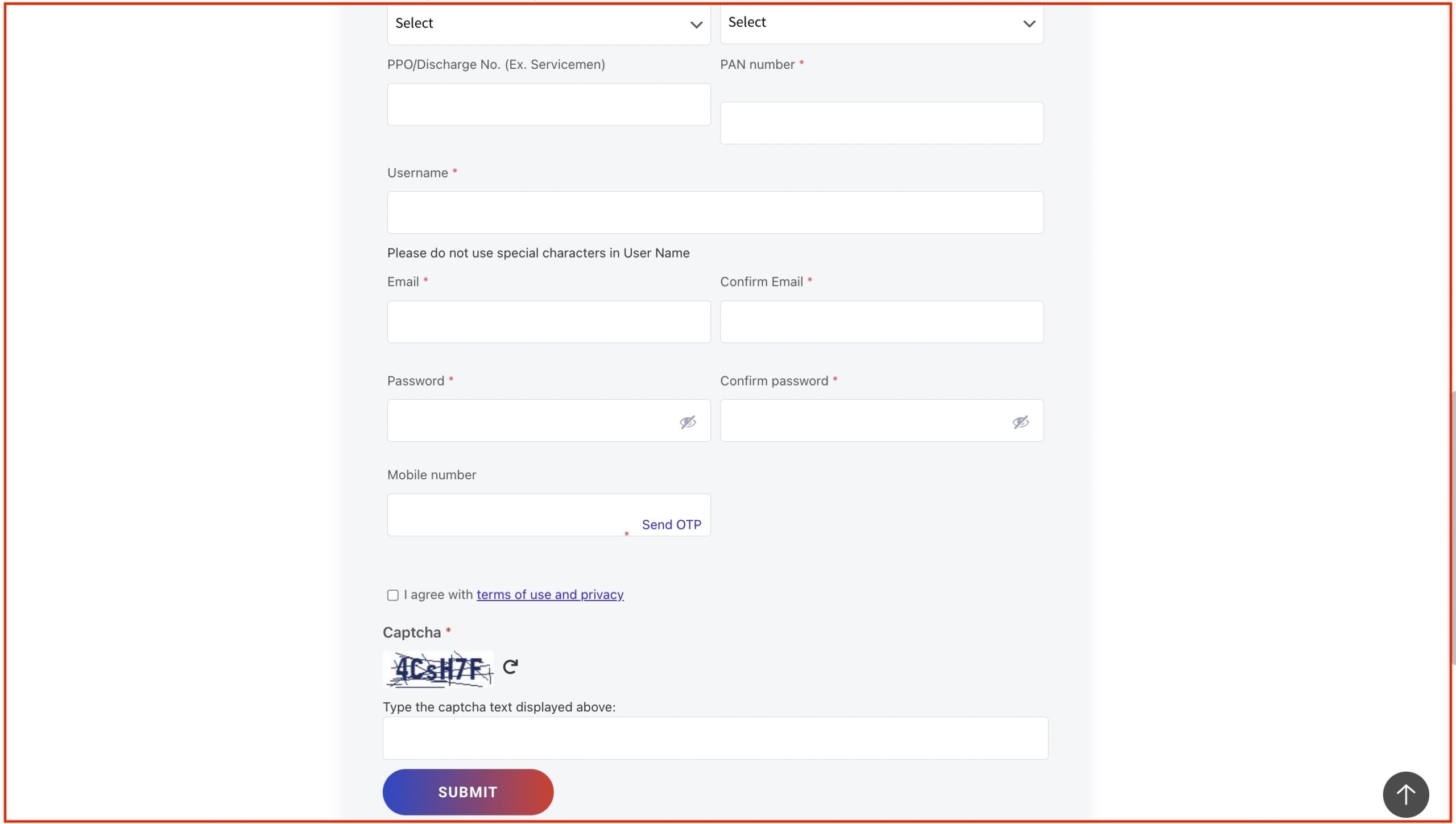
Submit your registration:
Double-check all the information you provided, ensuring accuracy and completeness. Once you are satisfied, click on the "Submit" button to proceed.
Verification and Confirmation:
After submitting your registration, your information will be verified by the CSD AFD portal team. You will receive a confirmation message through the email address you provided upon successful registration.
After submitting your CSD AFD registration, the approval process begins. The registration approval typically takes around 2 to 3 days to be completed. During this time, the CSD Canteen authorities review the submitted information and documents to verify your eligibility and ensure compliance with the registration requirements.
The approval duration may vary depending on the volume of registrations and the verification process. It is essential to exercise patience during this period and avoid resubmitting your registration to allow the authorities ample time for processing. Once your registration is approved, you will receive a confirmation notification, enabling you to access the CSD AFD portal and enjoy the benefits of online shopping at discounted prices.
Starting October 2025, the CSD AFD portal has introduced new security steps to keep your account safer.
All users will need to update their CSD AFD online login id and password.The new rules require that your chosen passwords be at least 8 characters long. Also they need to include a mix of uppercase and lowercase letters, numbers, and special symbols.
For added protection, it is suggested that you change your password every 15 days.
These minor, yet beneficial, security measures will make sure that your account stays secure while you continue to enjoy the benefits of the CSD AFD portal.
AFD-2 Item Limits (Annual)
AFD-2 items are costly products like refrigerators, washing machines, microwaves, air conditioners, and smart TVs.
These can only be bought using the primary grocery card (i.e., not via dependent or liquor cards).
The total value cap for AFD-2 purchases is:
INR 20,000 per year for one dependent.
INR 10,000 per year per dependent if there are two dependents.
INR 20,000 for liquor card holders.
|
Item |
Annual Limit |
|
Mobile / Smartphone / Laptop / Tablet |
2 per year |
|
Microwave / Oven / OTG / Food Warmer |
1 per year |
|
Geyser / Water Heater / Oil Heater |
2 per year |
|
Mattress (any type) |
6 per year |
|
Suitcase / Duffle / Rucksack / Briefcase |
6 per year |
|
Water Purifier / Aquaguard |
1 per year |
|
Watch (any type) |
4 per Year |
|
Sewing Machine |
1 per year |
|
Cooler / Fan (all types) |
6 per year |
|
Pressure Cooker / Electric Cooker / Induction |
3 per year |
|
Bicycle (any type) |
2 per year |
|
Gas Stove / Burner |
2 per year |
|
Food Processor / Juicer / Mixer Grinder |
2 per year |
|
Room Bulbs / Tube Lights |
6 units |
|
Footwear (Chappals / Sandals) |
4 Pairs |
|
Non Stick Kitchenware |
2 units |
For any issues or concerns related to CSD AFD registration, you can seek assistance through the following contact details:
Registration Support Helpline: If you encounter any difficulties during the registration process or have queries regarding your registration status, you can reach out to the registration support helpline at 0120-4699923. The dedicated support team will be available to address your concerns and provide guidance.
SCPL Whatsapp Number: Alternatively, you can also contact the SCPL (Smart Chip Pvt. Ltd.) through WhatsApp at 9582250281. This platform allows you to communicate your registration-related issues or seek assistance conveniently via instant messaging.
Please note that these contact details are specifically provided for registration-related matters. For other inquiries or general information regarding CSD AFD services, it is advisable to refer to the official CSD AFD portal or contact the designated customer support channels.
By following the step-by-step process outlined on the official CSD AFD registration page and ensuring you have the required documents in the prescribed format, you can successfully register for CSD AFD.
Once registered, you can enjoy the convenience of online shopping and access a wide range of quality products at discounted prices. Visit the official CSD AFD portal, explore the available categories, and take advantage of the exclusive benefits offered through this platform. Start your CSD AFD registration journey today.

.png)
.png)
.png)
.png)
.png)
.png)

The CSD AFD portal provides a convenient way for serving and retired armed forces personnel, as well as defense civilians, to access a wide variety of products at special rates. To benefit from this facility, eligible individuals must complete an online CSD AFD login registration process.
This guide outlines the registration steps in a simple manner and details the documents required. Whether you’re new to the portal or need a refresher, this will help you register smoothly and begin using your account without any issue and delay.
By understanding this process, you can unlock the benefits of accessing quality products at competitive prices through the CSD AFD portal.
CSD AFD registration is open to serving and retired armed forces personnel & defense civilians only. Ensure you meet the eligibility criteria outlined on the official CSD AFD registration page before proceeding with the registration process. Below is the list of eligible defence personnel :-
To complete the registration, you will need the following documents:
Smart Canteen Card
You will need a valid Smart Canteen Card issued by the Canteen Stores Department. The card contains important information such as your name, card ID, chip number, and organization details.
PPO
If you are an ex-serviceman, you will need to have a copy of your Pension Payment Order. The PPO contains essential details regarding PPO number, date of birth, date of enrollment, date of discharge & Pay level.
PAN Card
You should have your PAN card number to enter on the CSD AFD registration page.
Mobile Number & Email Address
The eligible person should have an active mobile number and email address. The mobile number & email id is used to send OTP, password reset and communication regarding CSD AFD product orders. Therefore, use the active mobile and email id during rgistration.
Please ensure that all the documents and information you provide are valid, up-to-date, and in the prescribed format. Any discrepancies or incomplete information may result in delays or rejection of your registration.
After registration, the eligible CSD customers can check car prices, bike price and CSD dealers after CSD AFD login and place online orders on CSD portal.
To register yourself on CSD AFD portal, you can follow the below steps:-
Search "afd.csdindia" in google search.
To access the CSD AFD registration portal, open the google search in web browser. Thereafter search "afd.csdindia" in google. You will get CSD portal in the search result as shown in the image below. Click on it and you will be redirected to offical CSD AFD portal.
Go to CSD AFD login page.
On the CSD AFD portal homepage, you will get a button named SHOP NOW. Click on it. It will redirect you on the CSD AFD login page. On this page, you will find username, password and captcha option as shown in the below image. This page is for registered users. Click on the "New user Registration" button.
Open CSD AFD online registration page.
After clicking the "New user Registration" tab, it will redirect you to the registration page as shown below.
Fill in the registration form:
Provide the requested information in the appropriate fields:
Submit your registration:
Double-check all the information you provided, ensuring accuracy and completeness. Once you are satisfied, click on the "Submit" button to proceed.
Verification and Confirmation:
After submitting your registration, your information will be verified by the CSD AFD portal team. You will receive a confirmation message through the email address you provided upon successful registration.
After submitting your CSD AFD registration, the approval process begins. The registration approval typically takes around 2 to 3 days to be completed. During this time, the CSD Canteen authorities review the submitted information and documents to verify your eligibility and ensure compliance with the registration requirements.
The approval duration may vary depending on the volume of registrations and the verification process. It is essential to exercise patience during this period and avoid resubmitting your registration to allow the authorities ample time for processing. Once your registration is approved, you will receive a confirmation notification, enabling you to access the CSD AFD portal and enjoy the benefits of online shopping at discounted prices.
Starting October 2025, the CSD AFD portal has introduced new security steps to keep your account safer.
All users will need to update their CSD AFD online login id and password.The new rules require that your chosen passwords be at least 8 characters long. Also they need to include a mix of uppercase and lowercase letters, numbers, and special symbols.
For added protection, it is suggested that you change your password every 15 days.
These minor, yet beneficial, security measures will make sure that your account stays secure while you continue to enjoy the benefits of the CSD AFD portal.
AFD-2 Item Limits (Annual)
AFD-2 items are costly products like refrigerators, washing machines, microwaves, air conditioners, and smart TVs.
These can only be bought using the primary grocery card (i.e., not via dependent or liquor cards).
The total value cap for AFD-2 purchases is:
INR 20,000 per year for one dependent.
INR 10,000 per year per dependent if there are two dependents.
INR 20,000 for liquor card holders.
|
Item |
Annual Limit |
|
Mobile / Smartphone / Laptop / Tablet |
2 per year |
|
Microwave / Oven / OTG / Food Warmer |
1 per year |
|
Geyser / Water Heater / Oil Heater |
2 per year |
|
Mattress (any type) |
6 per year |
|
Suitcase / Duffle / Rucksack / Briefcase |
6 per year |
|
Water Purifier / Aquaguard |
1 per year |
|
Watch (any type) |
4 per Year |
|
Sewing Machine |
1 per year |
|
Cooler / Fan (all types) |
6 per year |
|
Pressure Cooker / Electric Cooker / Induction |
3 per year |
|
Bicycle (any type) |
2 per year |
|
Gas Stove / Burner |
2 per year |
|
Food Processor / Juicer / Mixer Grinder |
2 per year |
|
Room Bulbs / Tube Lights |
6 units |
|
Footwear (Chappals / Sandals) |
4 Pairs |
|
Non Stick Kitchenware |
2 units |
For any issues or concerns related to CSD AFD registration, you can seek assistance through the following contact details:
Registration Support Helpline: If you encounter any difficulties during the registration process or have queries regarding your registration status, you can reach out to the registration support helpline at 0120-4699923. The dedicated support team will be available to address your concerns and provide guidance.
SCPL Whatsapp Number: Alternatively, you can also contact the SCPL (Smart Chip Pvt. Ltd.) through WhatsApp at 9582250281. This platform allows you to communicate your registration-related issues or seek assistance conveniently via instant messaging.
Please note that these contact details are specifically provided for registration-related matters. For other inquiries or general information regarding CSD AFD services, it is advisable to refer to the official CSD AFD portal or contact the designated customer support channels.
By following the step-by-step process outlined on the official CSD AFD registration page and ensuring you have the required documents in the prescribed format, you can successfully register for CSD AFD.
Once registered, you can enjoy the convenience of online shopping and access a wide range of quality products at discounted prices. Visit the official CSD AFD portal, explore the available categories, and take advantage of the exclusive benefits offered through this platform. Start your CSD AFD registration journey today.
Important decisions like car purchase are often confusing. The “Compare Cars” tool from CarWale is designed to help you in car comparison on the basis of prices, mileage, power, performances and hundreds of other features and specifications. Our car comparison tool now comes with enhanced capabilities to compare cars at version level.




.png)